


The Self-Cultivation of a "Strong Heart": How to Choose a Motherboard for 24/7 High-Intensity Digital Signage?
In the digital signage industry, the hardware chassis is the "skin," the screen is the "face," and the motherboard is the "heart" that beats day and night without rest.
Many clients, when purchasing, tend to focus only on whether the screen is bright enough or the chassis is slim enough, while overlooking the motherboard hidden deep inside the machine. The result is often this: after six months of operation, devices frequently black out, freeze up, or even "collapse from heat stroke" and fail completely during scorching summer days. For a digital signage unit that needs to be on standby 24/7, choosing a motherboard is never as simple as checking CPU specs.
Today, let's break down the four essential self-cultivations that a "strong heart" must possess.
I. Rejecting "Fragility": Industrial-Grade Endurance
[Case Review] A chain convenience store once purchased a batch of low-cost digital signage units, installing them in window displays near entrance doors. When summer heat arrived, internal temperatures near the glass soared above 60°C, causing motherboard capacitors to bulge and batches of devices to fall into an "infinite reboot" loop.
Selection Secrets:
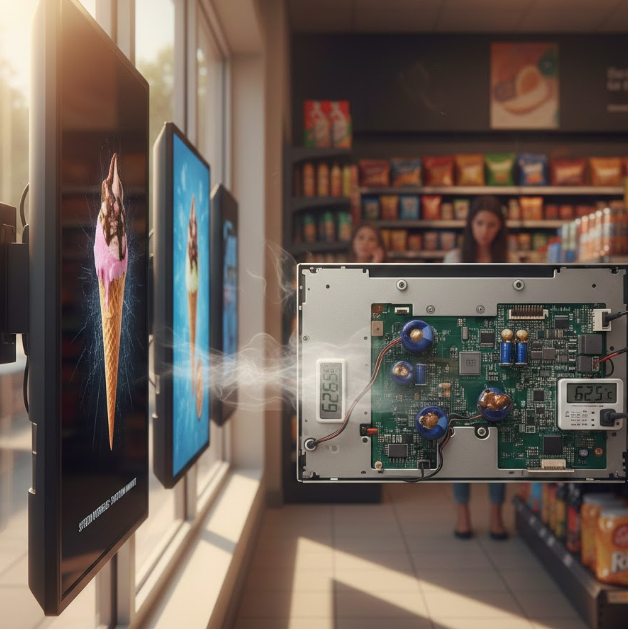
Wide-Temperature Design: Consumer-grade motherboards are typically designed for 0°C-40°C environments, while true digital signage motherboards must adopt industrial-grade wide-temperature design (e.g., -20°C to 70°C).
All-Solid Capacitors: Insist on all-solid capacitors. They prevent electrolyte evaporation and explosion risks under high temperatures, ensuring stable operation even under blazing sun.
II. Saying Goodbye to "Manual Power Cycles": The Life-Saving Skill of Watchdog
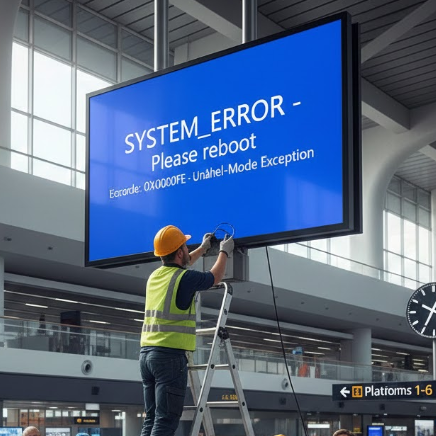
[Case Review] A wayfinding digital signage unit at a high-speed rail station froze due to system abnormalities, with the screen stuck on an error dialog. Since the device was suspended 5 meters high, maintenance staff had to bring a tall ladder and power-cycle it in full public view. This minute of embarrassment came with expensive maintenance costs behind it.
Selection Secrets:
Hardware Watchdog: Excellent digital signage motherboards must have built-in hardware-level watchdog circuits. When the system detects software freezing beyond a preset time (e.g., 30 seconds), the motherboard automatically triggers a hard reboot.
Value Proposition: This technology solves over 90% of "fake death" issues, freeing your operations team from meaningless "on-site power cycling" runs.
III. Strong "Diplomatic Skills": Rich Interface Expandability
[Case Review] A shopping mall project required digital signage to not only play videos but also connect to human body sensors (screen lights up when people approach), receipt printers (printing coupons), and facial recognition payment cameras. If the motherboard lacks sufficient interfaces, additional converter boards are needed—greatly increasing failure points.
Selection Secrets:
Interface Grand Slam: An excellent motherboard should natively integrate multiple display interfaces including LVDS, EDP, and HDMI, with at least 4-6 USB ports and 2-4 serial ports (UART).
Network Redundancy: Ideally supports Gigabit Ethernet, dual-band Wi-Fi, and reserved 4G/5G module slots, ensuring real-time content updates even in complex mall signal environments.
IV. Intelligent "Evolutionary Potential": Balance Between Computing Power and AI
[Case Review] By 2026, digital signage that simply loops MP4 videos has lost competitiveness. One brand implemented lightweight AI algorithms on the motherboard to achieve "reading the room": pushing skincare products when female pedestrians are detected, and digital products when male pedestrians are detected.
Selection Secrets:
Integrated NPU: When selecting motherboards, focus on whether the chip integrates an NPU (Neural Processing Unit).
Computing Headroom: We recommend motherboards with at least 1T-2T TOPS computing power (such as RK3568 series or higher). This reserves space for future interactive upgrades (such as AR try-on, foot traffic statistics), preventing devices from becoming obsolete immediately after deployment.
Conclusion
Buying digital signage is actually buying "peace of mind." A motherboard with high-temperature resistance, self-recovery, broad expandability, and high computing power may cost 10%-15% more in initial procurement, but it saves years of future repair costs, travel expenses, and brand reputation losses.
About iMGS Display
On the journey toward this "strong heart," IMGS Display has always been at the forefront of the industry. As a global leading expert in commercial display solutions, we deeply understand the strategic significance of motherboard stability for digital signage operations.
Our full range of digital signage products features industrial-grade high-performance motherboards custom-built for 24/7 environments. From wide-temperature operation supporting -20°C~70°C, to built-in intelligent hardware watchdog systems, to AI interaction solutions integrating high-computing-power NPUs—IMGS Display is not just selling a screen, but providing you with a highly reliable, low-maintenance-cost commercial communication engine.
Why Choose iMGS Display?
Extreme Stability: Carefully selected first-tier industrial-grade components ensure rock-solid operation even in harsh environments.
Intelligent Connectivity: Hardware deeply compatible with mainstream CMS systems, putting your content management within reach, no matter how far.
Customized Solutions: For retail, transportation, healthcare, and other industries, we provide closed-loop customization services from motherboard selection to finished product delivery.