


In the commercial display industry, many business owners have the same initial reaction when sourcing digital signage: "They look almost identical, so why is this one $150 more expensive than the other?"a
While a low price is tempting, commercial equipment is never a "one-and-done" purchase. If you only focus on the initial "entry price," the hidden costs over the next 3–5 years could end up costing you several times the original price difference.
Today, let’s pull back the curtain on low-cost displays and discuss the three most overlooked hidden costs in digital signage.
1. Performance Degradation: Is Your Display "Overworking" Itself to Death?
Hidden Costs: Screen decay, motherboard burnout, and frequent blackouts.
The biggest difference between a home TV and commercial digital signage is the workload intensity. Low-cost displays often use consumer-grade panels or refurbished screens paired with cheap motherboards.
Real-world Example: A restaurant chain installed budget-grade, non-industrial displays in their storefront windows to save money. Within less than three months—due to direct sunlight and poor heat dissipation—large "black spots" (liquid crystal thermal failure) appeared on the screens.

The Price of "Saving": Because the product lacked an industrial cooling structure and high-temperature resistance, the repair cost was nearly equal to buying a new unit. To save 30% on initial procurement, they ended up making a 100% reinvestment in less than half a year.
Pro Tip: Always verify if the device features an industrial-grade motherboard and certification for 24/7 continuous operation.
2. Operational Labor Costs: Are You Buying Equipment or Hiring a "Handyman"?
Hidden Costs: Manual content updates, system lag, and software licensing fees.
Many low-end machines do not come with a supporting Content Management System (CMS), or the provided software is extremely difficult to use.
Real-world Example: A clothing brand with 20 outlets purchased a batch of cheap displays that did not support remote synchronization. Every time they launched a promotion, the marketing department had to mail 20 USB drives to different stores, where staff would manually plug them in to update the content.

The Price of "Saving": Think about the cost of the USB drives, courier fees, and communication time—but most importantly, the time lag. During one major sale, two stores forgot to plug in the drives. The lost sales revenue from failing to communicate the promotion far exceeded the money saved on the hardware.
Pro Tip: Ask if there is a mature cloud-based management system. Can you achieve "one-click distribution"? Is remote monitoring included?
3. Energy & Safety Costs: The Invisible "Power Hog" and Fire Hazards
Hidden Costs: Skyrocketing electricity bills, power short circuits, and substandard fire ratings.
To cut costs, budget machines often use low-efficiency power supplies and non-flame-retardant materials.
Real-world Example: A property management company installed several low-quality displays in office building elevators. A year later, an audit revealed these machines consumed over 25% more electricity than high-end models of the same size. More alarmingly, one unit caught fire due to an aging power adapter. Fortunately, it was caught early, or the consequences would have been disastrous.
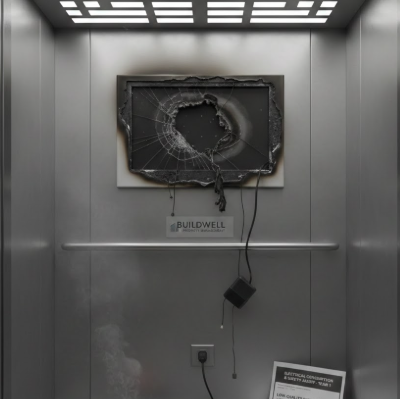
The Price of "Saving": Long-term electricity expenses add up to a fortune. Furthermore, if a safety accident occurs, the damage to brand reputation and the legal liabilities are immeasurable.
Pro Tip: Check if the product has standard safety certifications (like 3C, CE, or UL), and confirm the power conversion efficiency and fire resistance rating.
Conclusion
When you buy digital signage, you are buying a "productivity tool," not a decoration. The price of a "bargain" is often paid by your future self. Before placing an order, ask yourself: Can this machine run stably for years? Is the back-end update process seamless? Are the safety certifications complete?
Smart decision-makers pay for stability and efficiency, not just a screen.
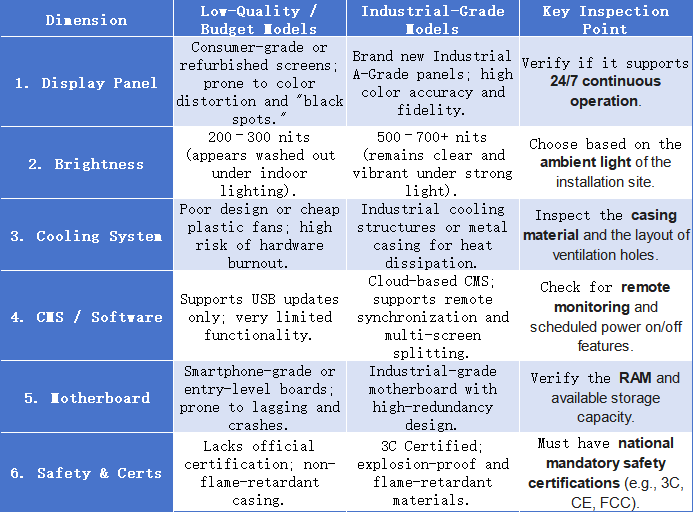
Avoiding pitfalls requires more than just experience—it demands scientific parameter comparison. If you are planning to procure commercial display equipment, we recommend saving the checklist below. It provides a direct comparison between 'industrial-grade' and 'budget' models across core dimensions, helping you identify low-price traps at a glance.