



6,000m² Factory | 400+ Classic Cases | 85+ Patents | 1,000+ Projects |
You’ve decided a touch screen kiosk is right for your business. Now comes the question that trips up most first-time buyers: floor or wall? The choice affects your install cost, how visible the screen is, and even how much you sell. This guide compares a floor standing kiosk against a wall mounted touch screen kiosk in plain terms, so you can pick the right one before you place the order, not after.
Quick Comparison at a Glance
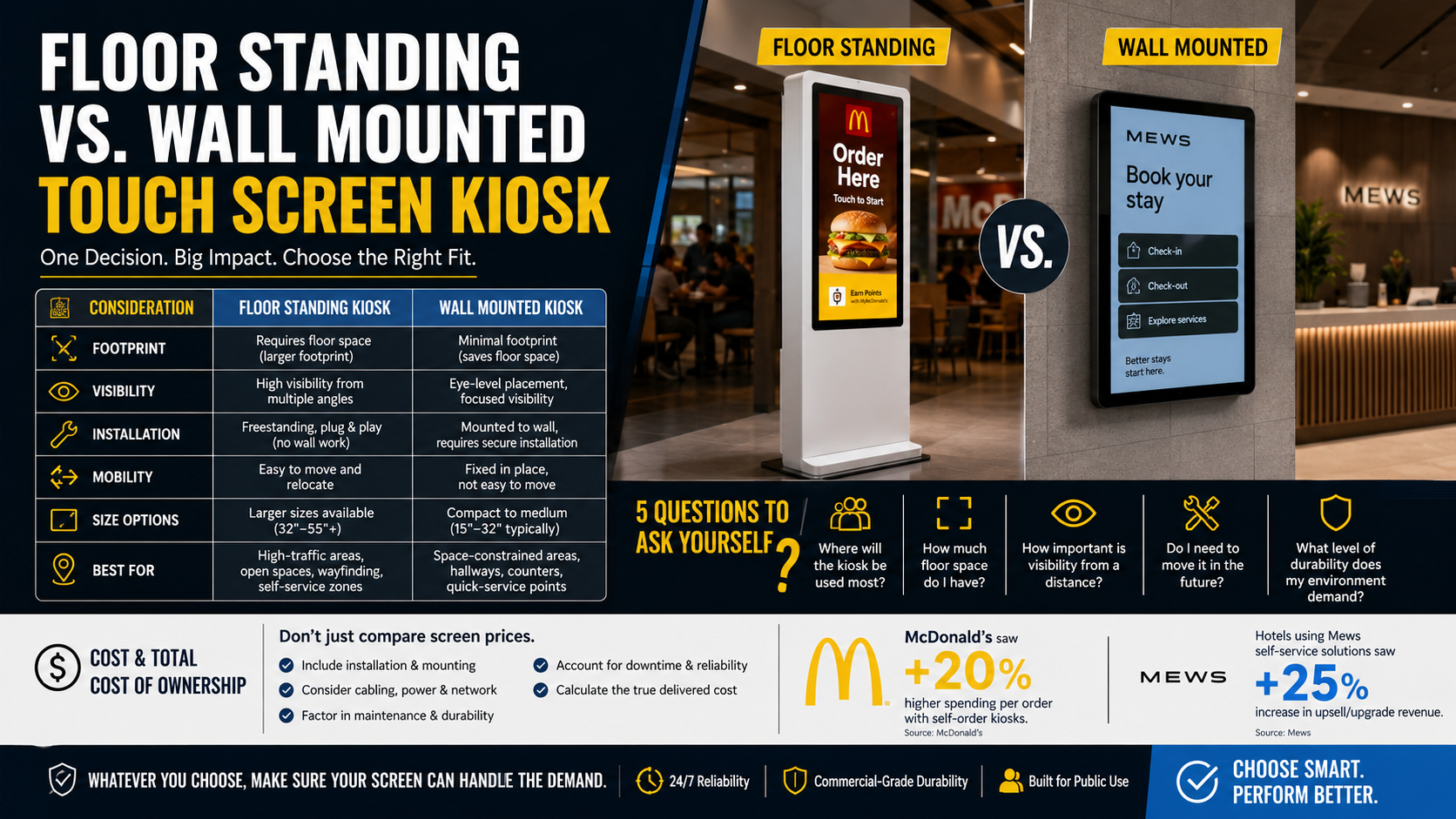
Factor | Floor Standing Kiosk | Wall Mounted Touch Screen Kiosk |
Footprint | Free-standing, needs floor space | Zero floor space, mounts on the wall |
Visibility | High — stands at eye level, seen across a room | Good — but tied to one wall position |
Installation | Place and plug in, no drilling | Needs wall fixing and cable routing |
Mobility | Can be repositioned; some on wheels | Fixed once mounted |
Typical sizes | 43” to 55” and up | 32” to 65” |
Best for | Entrances, open floors, self-order, wayfinding | Corridors, tight shops, menu boards, check-in walls |
Read the table top to bottom and one pattern stands out: a floor standing kiosk trades floor space for visibility and flexibility, while a wall mounted unit trades flexibility for a clean, space-saving install. Neither is better in the abstract. The right pick depends entirely on your room, your traffic, and how permanent the setup needs to be. The sections below break down where each one shines.
What a Floor Standing Kiosk Does Best
A floor standing kiosk stands on its own in the middle of a space, which is exactly why it pulls attention. Placed at an entrance or in an open concourse, it acts like a magnet: people walk up to it without being told to. McDonald’s put floor standing kiosk units at its restaurant entrances and reported about a 20% lift in average order size, because the screen meets customers the moment they arrive. For self-order, wayfinding, and ticketing, the floor standing kiosk is the default choice.
The trade-offs are simple. A floor standing kiosk takes up floor space you might need for seating or stock, and it usually costs a little more than a bare wall screen because the price includes the enclosure and base. But you gain flexibility: many floor standing kiosk models can be repositioned, and some ship on wheels, so you can move the screen to wherever the foot traffic is that week. If your space is open and you want the kiosk to draw a crowd, floor standing wins.
One practical point buyers often forget: a floor standing kiosk needs a power point within reach of its base, so plan the layout around your sockets or budget for a floor outlet. The upside is that everything — screen, computer, speakers, card reader — lives inside one enclosure, so there are no exposed cables for the public to tamper with. For QSR self-order and airport wayfinding, that all-in-one ruggedness is a big part of why the floor standing kiosk has become the standard.
What a Wall Mounted Touch Screen Kiosk Does Best
A wall mounted touch screen kiosk frees up every inch of floor. It sits flat against the wall, so it never blocks a walkway or eats into a small shop. For narrow corridors, compact retail, and busy receptions, a wall mounted touch screen kiosk is the cleaner fit. It is the standard choice for digital menu boards above a counter, hotel check-in walls, and office reception sign-in points where a free-standing unit would just be in the way.
The trade-offs run the other way. A wall mounted touch screen kiosk is fixed once installed, so you cannot move it without re-drilling. It also needs proper wall fixing and hidden cabling, which means a slightly more involved install. For a permanent fit-out that is no problem; for a rented space where you cannot touch the walls, it can be a dealbreaker. A retail-grade wall mounted display in 32” to 65” covers most indoor jobs, from a single menu board to a wall of synced screens.
5 Questions That Decide It for You
1. How much floor space do you have? Tight or cluttered, go with a wall mounted touch screen kiosk. Open and roomy, a floor standing kiosk earns its footprint by pulling people in.
2. Where do you want eyes to land? Center of the room, choose floor standing. Along a natural walking path or above a counter, a wall mounted touch screen kiosk sits right in the sightline.
3. Will you ever move it? If your layout changes with seasons or events, a floor standing kiosk (especially one on wheels) saves you. If the spot is permanent, wall mounting is tidier.
4. What are your install constraints? Renting, or want zero drilling? A floor standing kiosk just plugs in. Doing a full fit-out with an electrician on site? A wall mounted screen with concealed wiring looks cleanest.
5. How exposed is the location? In a high-theft or unstaffed area, a wall mounted unit is harder to walk off with, while a floor standing kiosk can be bolted down for the same protection.
A Quick Word on Cost and Total Ownership
On the sticker price, a bare wall screen often looks cheaper than a floor standing kiosk, because the floor unit includes an enclosure, a base, and sometimes a built-in computer. But the sticker is not the whole cost. A wall mounted touch screen kiosk usually needs professional installation: drilling, bracket fitting, and cable concealment that an electrician has to do. A floor standing kiosk arrives ready to plug in, so the install cost is close to zero. Over a fleet of ten or twenty units, those install fees add up fast, and the gap between the two options narrows or even flips. When you compare quotes, ask for the delivered-and-installed price, not just the hardware price.
Maintenance follows the same logic. A floor standing kiosk keeps every component sealed in one housing, so a faulty part is swapped without touching the wall. A wall mounted screen sits higher and flatter, which makes it tidy but can mean a ladder and two people for any service call. Factor that into busy venues where downtime costs sales.
Either Way, the Panel Has to Deliver
Both mounting styles only pay off if the screen survives daily public use. McDonald’s saw its 20% order-size lift from floor standing kiosk units running all day, every day. Mews hotels reported 25% higher upsells from check-in kiosks that never miss a prompt. Neither result holds with a consumer-grade panel that overheats or drifts out of calibration. Whether you choose a floor standing kiosk or a wall mounted touch screen kiosk, commercial-grade panels and 100% pre-shipment testing are what keep the returns coming for years instead of weeks.
Source Floor and Wall Kiosks from iMGS
Xiamen iMGS Technologies builds both styles in its own 6,000m² factory. Every floor standing kiosk and wall mounted touch screen kiosk ships with ISO 9001, CE, FCC, China 3C, and UL certifications and runs through 100% pre-shipment testing. With 400+ classic cases and 85+ patents, iMGS handles OEM and ODM from enclosure to software image, so the unit carries your brand. Read the factory background on the direct manufacturer page.
Whichever way you lean, there is a matching model ready to quote:
Floor Standing Kiosk — Digital Signage AD Screen 43” capacitive touch, Android OS, HDMI and 4G options. The go-to for self-order, wayfinding, and entrances. |
Wall Mounted Touch Screen Kiosk Space-saving touch display that mounts flat on the wall. Ideal for menu boards, check-in walls, and tight retail. |
Full Touch Screen Kiosk Range Compare floor-standing, wall-mounted, dual-sided, and battery models side by side. |
Still not sure which one fits? Ask us. Send us your space, screen size, and quantity. We reply within one working day with a floor or wall recommendation and pricing. Email: irenepan@fj-imgs.com Phone / WhatsApp: +86-18850151946 |